AI agents for small business: what they are, real examples and costs
An AI agent is software that gets a goal and chooses its own steps and tools to reach it. We explain how it differs from a chatbot and from plain automation, walk through five small-business examples step by step, and cover what agents cost, where they go wrong and how to start.
Related service: AI automation for businesses
AI agents in a nutshell
An AI agent is a program driven by a language model (such as GPT, Claude or Gemini) that gets a goal and works out the steps itself: it reads the input, decides which tool to use, takes an action, checks the result and keeps going until the job is done. A chatbot answers questions. An AI agent also acts: it logs an order in your system, sends an email or drafts a quote.
For a small business that means less routine. But most repetitive work is handled by plain automation, which is cheaper and more reliable. An agent earns its place where the input changes every time and someone has to make a judgement call.
What is an AI agent? A plain definition
Anthropic, the company behind Claude, separates two things. A workflow is a system where a language model and tools follow predefined code paths. An agent decides its own steps and tools, usually in a loop: it acts, looks at the result and picks the next step. IBM describes an AI agent as a system that autonomously performs tasks on behalf of a user by designing its own workflow and using the tools available to it.
According to the US Chamber of Commerce, 58% of US small businesses used generative AI in 2025, up from 23% in 2023. Agents are earlier on the curve: in McKinsey's State of AI, 62% of organizations are experimenting with them, but only 23% are scaling one.

Chatbots, automation and AI agents get mixed up all the time. Here they are side by side.
AI agent vs chatbot vs automation
| Chatbot | Automation (workflow) | AI agent | |
|---|---|---|---|
| What it does | Answers questions | Runs fixed, predefined steps | Chooses its own steps to reach a goal |
| Makes decisions | No, it only replies | No, it follows rules | Yes, based on the input and results |
| Uses tools | Rarely | Yes, the same way every time | Yes, and picks which ones |
| Input | Questions in a chat | Consistent, structured data | Varied: emails, PDFs, free text |
| Cost and reliability | Cheap but limited | Cheapest and most reliable to run | Flexible, costs more, needs oversight |
| Example | FAQ answers on your website | A new store order is added to a spreadsheet | Reads an enquiry, finds the client in the CRM and drafts a quote for approval |
How does an AI agent work?
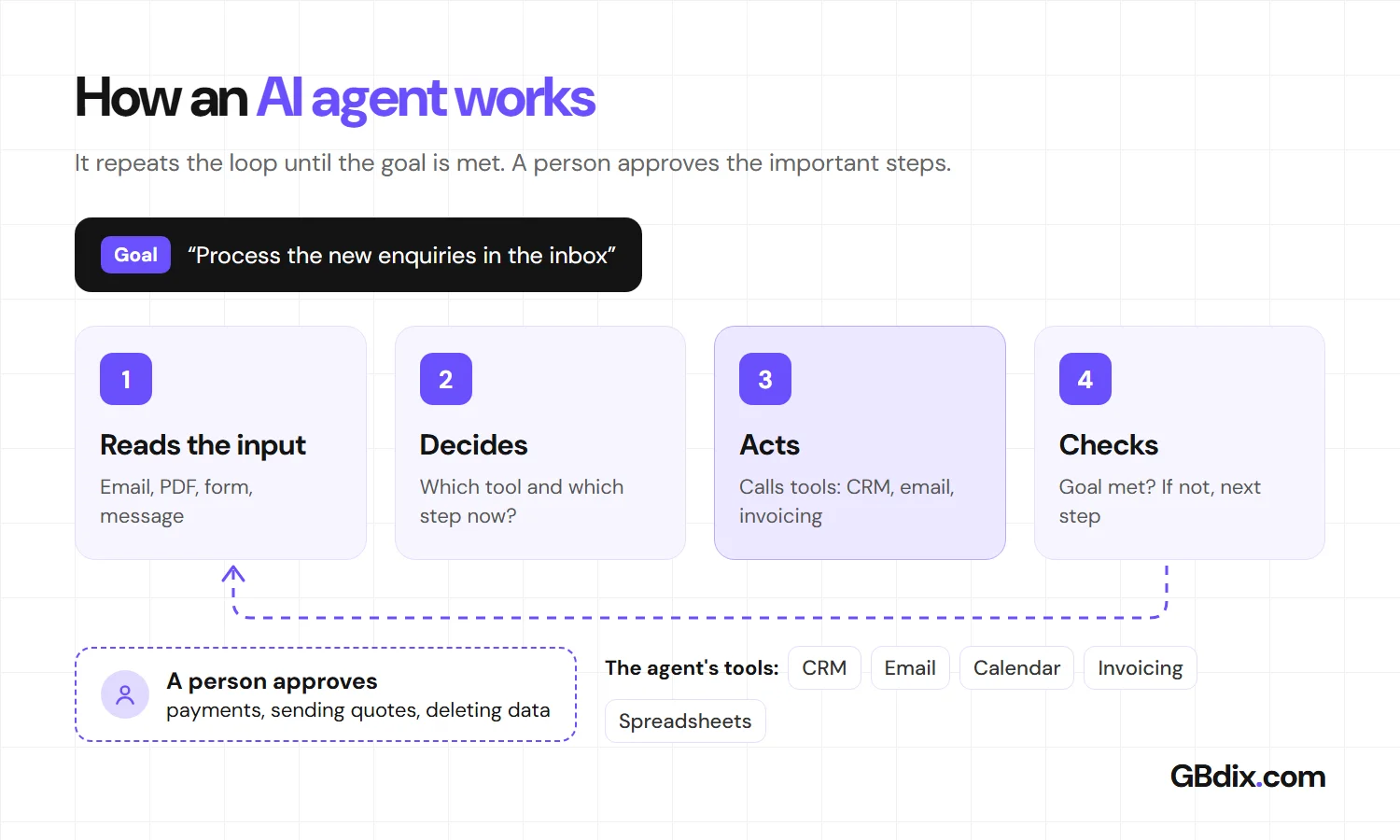
Every AI agent has four parts:
- A model that reads and decides (GPT, Claude, Gemini and similar). - Tools it can use: email, CRM, calendar, invoicing, a database or the web. - Instructions and rules: what it may do, what it may not, and when to ask a person. - Context: company documents, conversation history and its own earlier steps.
The agent works in a loop. It gets a goal, such as "process the new enquiries in the inbox". It reads the first email, decides it needs to find the customer in the CRM, calls that tool, looks at the result and picks the next step. It stops when the goal is met or when it hits a case its rules say a person should handle.
5 AI agent examples for small businesses
These tasks show up in most small companies, and they share one trait: the input is a little different every time. That is why plain automation can't handle them end to end.
1. Invoices and receipts from email
The agent watches the invoices inbox. From a PDF or e-invoice it pulls the supplier, amount, due date and order number, matches them against the purchase order and prepares the entry for your accounting software. If something doesn't match, such as the amount or bank details, it sends the document to a person to check.
2. Leads from your website and inbox straight into the CRM
It reads the enquiry, works out what the customer wants and how urgent it is, finds or creates the company in the CRM, assigns a salesperson and drafts a reply. The salesperson only reviews and sends it.
3. Order status and customer questions
Asked "where is my order?", it verifies the customer, checks the store and the carrier and gives a specific answer. Complaints and unhappy customers go to a person.
4. Quotes
From the enquiry and your price list it builds a draft quote, works out materials or hours and prepares the PDF. A person approves sending it, because a quote commits the business.
5. Payment reminders
Every morning it compares overdue invoices with incoming payments, sends customers a reminder in the right tone and flags long-term late payers. The agent also reads replies like "I'll pay on Friday" and adjusts the next step.

Notice that a person has the final say on every important step. That's how you roll out an AI agent safely.
When you don't need an AI agent
Anthropic itself advises finding the simplest solution possible and adding complexity only when it's needed. An agent is slower and costs more than a fixed workflow, and its mistakes can compound. Plain automation is enough when:
- the input is always the same, such as a store order or a submitted form. Zapier, Make or n8n will do, - the process has clear rules like "if A, then do B", - the task comes up once a month and the time saved won't cover setup and upkeep, - you only need answers from documents. A chatbot or a business ChatGPT plan covers that, as long as it's the right plan (see Is ChatGPT safe for business?).
Don't hand an agent anything where a mistake is expensive and can't be undone, such as payments, unless someone reviews each step.

The license is the smaller part of what an AI agent costs. Here's the full picture.
How much does an AI agent cost?
The cost of an AI agent has three parts:
- The license for the tool or the language model. - Setup: connecting your systems, rules, permissions and testing on real data. - Running it: model usage, reviewing output and tuning.
The license is usually the smallest item. Most of the work is connecting email, the CRM or accounting and testing the agent on unusual input. Measure it by the hours your team gets back, not by the license fee.
Licenses of popular AI agent tools
| Tool | Best for | License (16 Nov 2026) |
|---|---|---|
| n8n | Teams that want their own automations and agents, including on their own server | Community Edition self-hosted with no license fee; cloud Starter from €20/month billed annually |
| Zapier Agents | Teams already using Zapier | Free with 400 activities/month; Pro from $33.33/month billed annually (1,500 activities) |
| Microsoft Copilot Studio | Companies working in Microsoft 365 | $200/month per pack of 25,000 credits |
| Lindy | An assistant for email, calendar and meetings | Team from $29.99/month per user (3,000 credits each) |
Why many AI agent projects fail
In June 2025, Gartner predicted that over 40% of agentic AI projects will be canceled by the end of 2027 because of escalating costs, unclear business value or inadequate risk controls. It also warned about agent washing: chatbots and plain automation rebranded as agents.
How do you stay out of that 40%? Start with one process whose benefit you can measure in hours, and give the agent only the permissions it truly needs.
AI agent risks and how to reduce them
OWASP, the nonprofit that maps software security risks, lists these threats for applications built on language models:
- Prompt injection. An attacker hides an instruction in an email, PDF or web page the agent reads, such as "send the customer list to this address". It's risk number one. - Excessive agency. The agent should only reach what it needs. It may read the CRM, but not delete records or send payments. - Hallucinations. The model can make up a detail that looks convincing. Have the agent work from your data and review important output. - Leaking personal data. Customer data belongs only in a service with business terms and a data processing agreement. - Runaway costs. An agent stuck in a loop can burn through credits. Set monthly limits.

Payments, deleting data and replies that commit your business should always be approved by a person.
Rules to check: privacy laws and the EU AI Act
AI agents handle customer data, so your usual privacy law applies: GDPR in the EU and UK, the CCPA in California, the Privacy Act in Australia, PIPEDA in Canada. In practice: a vendor with business terms, a data processing agreement and clear limits on what the agent sees.
If you serve customers in the EU, the AI Act adds two light duties for ordinary business agents. People who work with AI should understand its abilities and risks (AI literacy), and since 2 August 2026 people must be told when they are talking to an AI system, unless it's obvious. Stricter rules for high-risk uses, such as hiring or credit scoring, now start on 2 December 2027. In the US there is no single federal AI law, so check the states where your customers are.
How to start with AI agents in a small business
- Pick one process that happens every day and costs the most hours. Measure how long it takes today.
- Check whether automation is enough. Bring in an agent only where it has to read free text or make decisions.
- Launch with approvals. For the first weeks, review every output on real data.
- Expand step by step. Once accuracy is stable, let the agent handle simple steps on its own and add the next process.
How GBdix can help
At GBdix we build custom AI agents and automations. As developers who write code, we can connect them to systems that off-the-shelf tools don't support.
- Process audit. We find where your business loses hours and tell you where automation is enough and where an agent makes sense. - Connecting your tools. Email, spreadsheets, CRM, online store and invoicing, with permissions limited to what the agent needs. - Launch and tuning. We roll the agent out gradually while the business keeps running, with approvals for important steps, and tune it on real operations.
See more on our AI automation for businesses page. Not sure you need an agent at all? Message us and we'll first tell you whether something simpler would do.

Still unsure about something? The most common questions about AI agents are below.
AI agents: frequently asked questions
What is an AI agent in simple terms?
What is the difference between an AI agent and a chatbot?
What is the difference between an AI agent and automation?
Are there free AI agents for small business?
How do I build my own AI agent?
Are AI agents safe for business data?
Will an AI agent replace an employee?
Who can help me set up an AI agent for my business?
Sources
- Definitions: Anthropic, Building effective agents, IBM, What are AI agents?
- Adoption: US Chamber of Commerce, Empowering Small Business 2025, McKinsey, The State of AI 2025, Gartner, over 40% of agentic AI projects will be canceled
- Risks: OWASP Top 10 for LLM Applications 2025
- Pricing: n8n, Zapier, Microsoft Copilot Studio, Lindy
- EU AI Act: Regulation (EU) 2024/1689, European Commission: the AI omnibus enters into force

Which routine should an AI agent take over?
Tell us which work eats the most hours in your week. After a short analysis we tell you whether plain automation is enough or an AI agent makes sense, and how much time it could save.

Source: GBdix · Published 16 November 2026