CRM implementation: cost, timeline and a 7-step plan
Buying a CRM license is easy. Getting your team to use it, with clean data inside, is the hard part. This guide breaks down CRM implementation cost, including onboarding fees, the hidden items that blow budgets, a realistic timeline, a 7-step plan and the reasons rollouts fail. We write as developers who build CRM systems and connect them to the rest of a company's tools.
Related service: Custom software and CRM for businesses
CRM implementation in a nutshell
CRM implementation means setting the system up around your sales process, moving your data in, connecting it to email and other tools, and teaching your team to work in it.
- Timeline: for a small team with an off-the-shelf CRM and a simple import, weeks. With data from several sources and integrations, months. - Cost: on top of licenses you pay for setup, data migration, integrations and your team's time. HubSpot, for example, charges a required one-time onboarding fee on its Professional and Enterprise plans. - The biggest risk isn't the technology. It's people not using the CRM.
Roll it out step by step: start with the one process that hurts most today, such as leads from your website.
What does CRM implementation include?
If you're still deciding whether you need a CRM at all, start with does your business need a CRM. The implementation itself has these parts:
- Process design: deal stages, required fields and who owns what. - Data migration: contacts, companies, open deals and communication history. - Integrations: email and calendar, website forms, accounting, online store. - Permissions and privacy: who sees what and how long you keep data. - Training and support during the first weeks after launch.

First the money. The license is only the first line of the budget.
CRM implementation cost: licenses and onboarding fees
| CRM | License from | Implementation fee | Notes |
|---|---|---|---|
| HubSpot Sales Hub | Professional $90 per seat/month, billed annually | Required onboarding $1,500 (Professional), $3,500 (Enterprise) | Starter has no required onboarding |
| Salesforce | Starter Suite $25, Pro Suite $100 per user/month | Not on the price list, larger rollouts go through partners | Pro Suite and above billed annually only |
| Pipedrive | Lite $14 per seat/month, billed annually | - | Easy start, paid add-ons |
| Raynet | Start €18 per user/month | - | Czech CRM popular in Central Europe |
| Custom CRM | No per-user license | Build cost depends on scope, priced after an analysis | You own the code and data |

Here's a plan that works for small teams too.
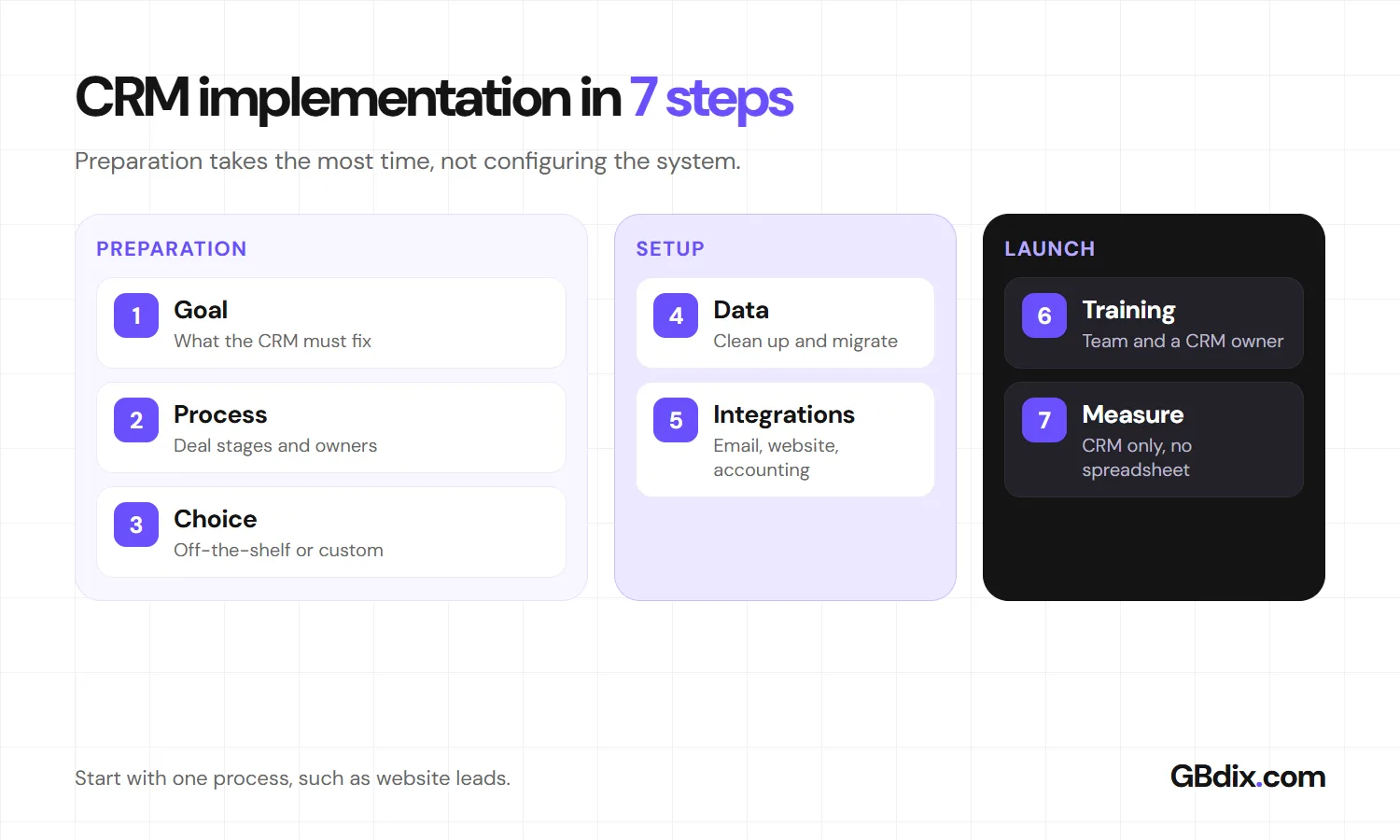
How to implement a CRM: a 7-step plan
- Decide what the CRM must fix. For example, "no lead left without a reply for 24 hours" or "a live view of open quotes for management". A measurable goal guides every later decision.
- Map your sales process: stages from lead to signature, who does what and which data they need. The CRM should follow your process, not the other way around.
- Choose the CRM. Off-the-shelf or custom? Test two or three systems on your own data during their free trials.
- Clean and migrate your data. Remove duplicates, standardize phone numbers and company names, and only move what you'll actually use.
- Connect your tools: email, calendar, website forms, accounting or your online store. Without integrations people retype data and the CRM goes stale fast.
- Train the team and name an owner. Short training on real cases, plus one person who guards the rules and answers questions.
- Launch and measure. From day one work only in the CRM, not in a parallel spreadsheet. After a month, check the goal from step one and adjust.
Why CRM implementations fail
A CRM rarely fails because of the technology. Usually people just don't start using it. In the EU, only 28.5% of companies with 10 or more employees use a CRM, so many teams are rolling out their first one. The most common mistakes:
- The CRM is a copy of the spreadsheet. Every column gets migrated and nobody sees why the new system is better. - Too many required fields. Adding a contact takes a minute, so salespeople note it somewhere else. - A parallel spreadsheet stays alive. As long as the old sheet counts, the CRM is never complete. - No email integration. People log communication by hand and give up after a week. - Management doesn't use it. If meetings run off a spreadsheet, the team learns the CRM doesn't matter.

If management doesn't use the CRM, the team won't either. Run your meetings from it.
CRM data migration checklist
Data migration is the step teams underestimate most. Before you import, prepare:
- One source: merge salespeople's spreadsheets, phone contacts and the old system into a single sheet. - Duplicate rules: match companies by a unique ID, such as a company or tax number, and contacts by email. - What to leave behind: companies inactive for years, notes nobody reads and contacts you have no legal basis to keep processing under GDPR, the CCPA or similar laws. - Deal history: open deals and recent communication are enough, the full archive can stay in the old system. - A test import: 50 records first, a check, and only then everything.
How to tell your CRM rollout is working
After the first month, don't ask whether the team likes the CRM. Measure:
- Share of deals in the CRM: every new lead and quote must be in the system, not in email. - Lead response time: how long it takes from a lead to the first reply. A CRM usually improves this number fastest. - Deal hygiene: how many open deals have no next step scheduled. - Meetings run from the CRM: whether management and the team use the system's reports instead of their own spreadsheets.
If a number is off, the cause is usually the setup rather than the people. Remove fields, add an integration or simplify the deal stages.
How GBdix can help
At GBdix we build custom CRM systems and connect them to online stores, accounting and other tools. For Fightshop, for example, we built a custom CRM for orders, customers, stock and revenue tracking.
- Choosing: we tell you whether an off-the-shelf CRM is enough or a custom one pays off. - Data migration and integrations: from spreadsheets or an old system, connected to your website, email, accounting and e-invoicing. - Custom CRM: built around your process, with no per-user license.
Learn more on our custom internal systems page, or get in touch and we'll propose a rollout plan for your company.
CRM implementation: frequently asked questions
How much does CRM implementation cost?
How long does it take to implement a CRM?
Can I implement a CRM myself?
How is implementing an off-the-shelf CRM different from a custom one?
Why don't salespeople use the CRM?
How do I migrate data from Excel to a CRM?
Who can help me implement a CRM?
Sources

Rolling out a CRM?
Tell us how you track customers and deals today. We'll propose a rollout plan, data migration and integrations, or a custom CRM if off-the-shelf tools don't fit.

Source: GBdix · Published 25 November 2026